




⚡50% Off⚡Rechargeable Electric Diamond Pen✨Precise, Comfortable, Time‑Saving
⚡50% Off⚡Rechargeable Electric Diamond Pen✨Precise, Comfortable, Time‑Saving

| Minimum Qty | Discount |
|---|
Couldn't load pickup availability

Creative Precision • Electric Convenience
Make Every Diamond Art Detail Easier
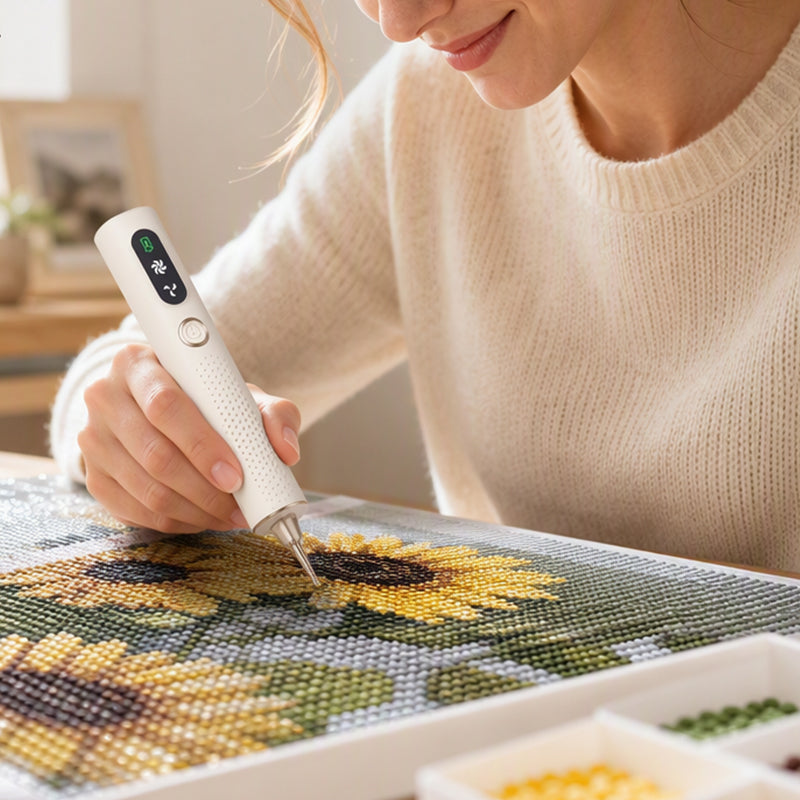
Bring a new level of convenience to your diamond painting projects with a rechargeable electric diamond pen. Designed with vacuum suction and two speed settings, it helps you pick up and place individual drills with a simple, controlled motion.
A Smarter Tool for Your Creative Time
From filling small sections to working through larger areas of a canvas, this electric diamond art pen offers an alternative to a traditional wax pen. Its cordless design and compact shape make it a practical addition to your diamond painting setup.
Why You'll Love It
Convenient operation and a thoughtfully shaped body help you focus on the colors, patterns and details of your next project.
Vacuum Suction Pickup
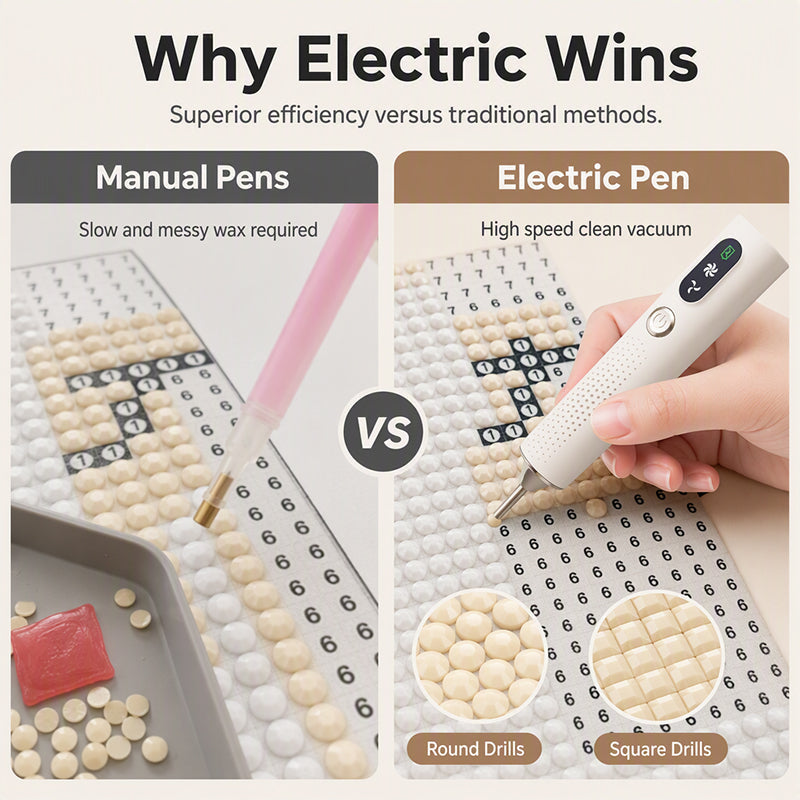
The vacuum-style tip is designed to pick up diamond painting drills without relying on the wax used by many traditional pens. This offers a different approach to everyday drill placement.
Two Speed Settings
Choose between two listed speed modes to suit your working pace and help you manage different stages of a diamond art project.
Cordless Convenience
The rechargeable design lets you work without keeping the pen connected to a charging cable during use.
Ergonomic-Style Grip
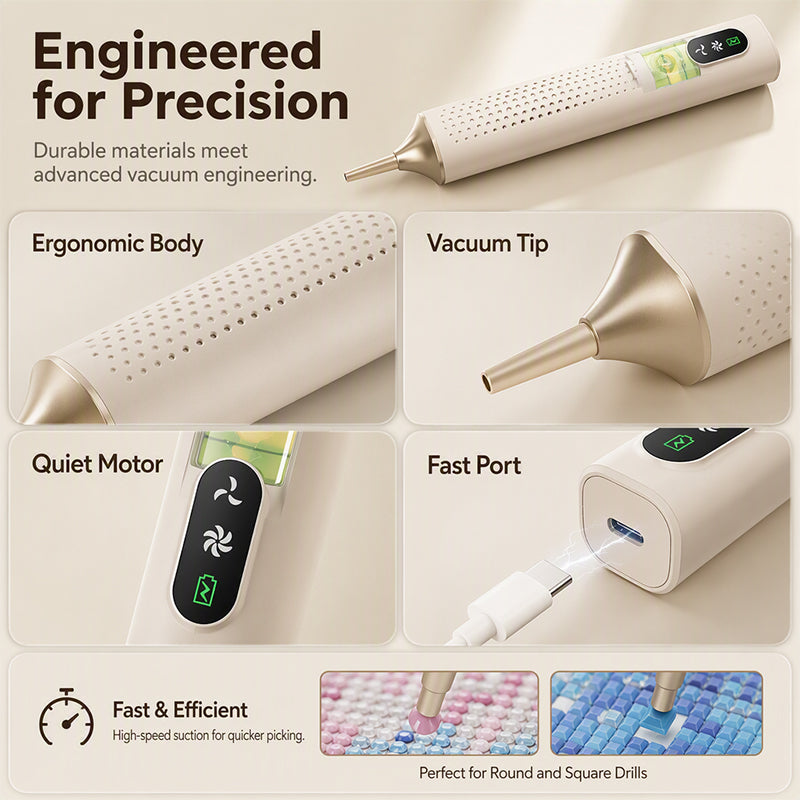
The slim, perforated body is shaped for a comfortable handhold, helping you maintain control while positioning small drills.
For Round and Square Drills
Product imagery shows the pen being used with both round and square diamond painting drills for a variety of canvas designs.
Compact Creative Companion
Its pen-style profile fits naturally into a home craft space and can be stored alongside your canvas, trays and drill organizers.
Designed Around Precision
The narrow pickup tip helps you approach individual drills on the canvas, while the pen-shaped body supports a familiar writing-style grip. The product imagery also highlights its control panel, suction tip and charging port.
Focus on One Drill at a Time
Position the tip over a drill, allow the pickup mechanism to hold it, and transfer it to the corresponding area on your canvas. A steady hand and a clear view of the pattern help you place each piece where it belongs.

A Grip Made for Creative Sessions
The slim shape and textured perforations offer a practical place to rest your fingers while you work. Find a relaxed grip that feels comfortable for you, and take regular breaks during longer craft sessions.
An Alternative to Traditional Wax Pens
Traditional diamond painting pens commonly use wax to pick up drills. This electric model instead uses a vacuum-style pickup mechanism, offering a different way to handle individual pieces while working through a design.
Made for Your Creative Routine
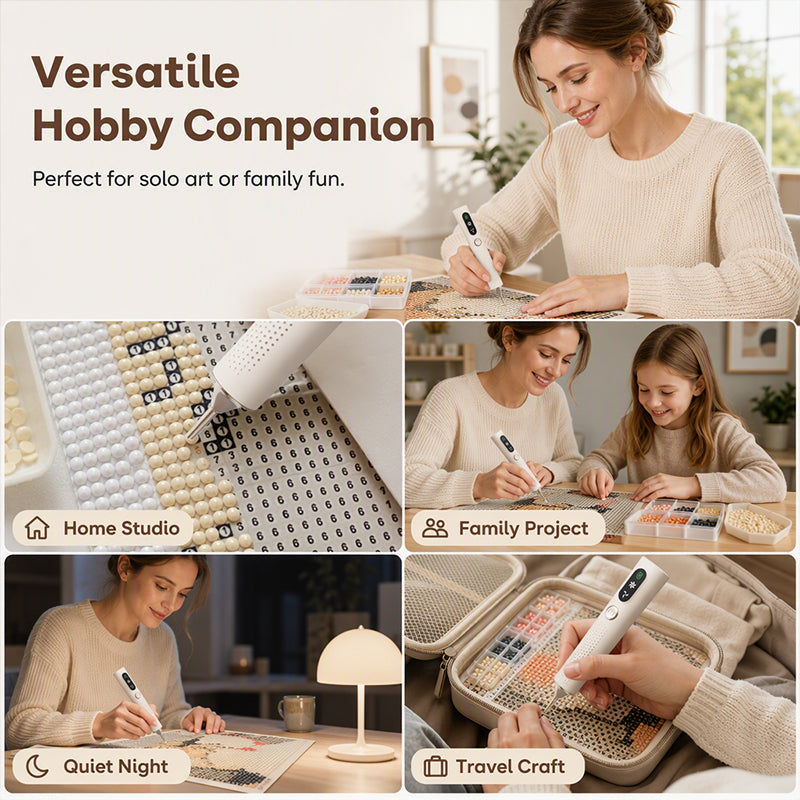
Set up your canvas, arrange your drills by color and keep your pen close at hand. Whether you enjoy crafting alone or sharing a hobby session with family, it fits naturally into a dedicated diamond painting workspace.
How to Use Your Electric Diamond Pen
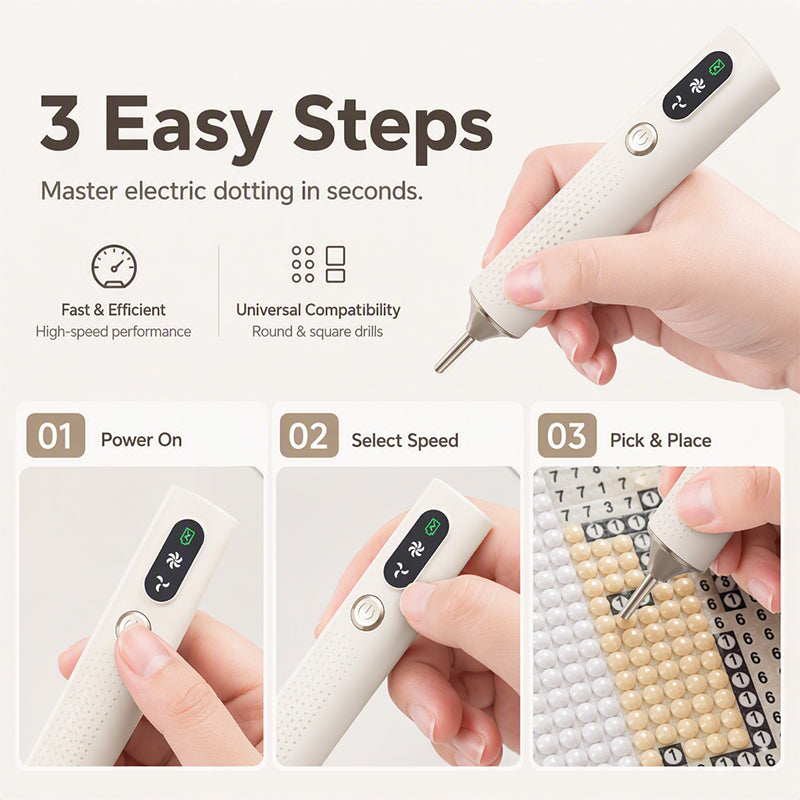
Follow the basic steps illustrated on the product page to get started. For exact button functions and maintenance, refer to the instructions supplied with your device.
Fully charge the pen before its first use. Place it on a clean, dry work surface and switch the device on according to its supplied instructions.
Choose one of the available speed settings based on your preferred pace. Start gently and become familiar with the pickup response before working on a large section.
Bring the tip to a drill, allow the suction to pick it up, and transfer it to the matching symbol on your canvas. Repeat as you work through the design.
Your Next Project Starts Here
Use your electric pen as part of your regular diamond painting setup, from smaller designs to larger, more detailed canvases.
Colorful Diamond Art
Organize your drills by shade and place each color in sequence to gradually reveal the image.
Detailed Canvas Areas
Work methodically through small sections while keeping your pattern, drill tray and pen within easy reach.
Relaxing Craft Time
Create a calm hobby routine at home by preparing your canvas and supplies before starting a session.
Round or Square Drills
The product imagery shows both drill shapes. Follow the normal placement method for the particular canvas you're using.
Product Specifications
| Product Type | Rechargeable Electric Diamond Painting Pen |
|---|---|
| Color | White |
| Material | PVC |
| Dimensions | 157.5 × 26.6 × 26.2 mm 6.20 × 1.05 × 1.03 inches |
| Pickup Method | Vacuum suction |
| Speed Settings | Two speed modes |
| Power | Rechargeable, cordless operation |
| Compatible Drill Shapes | Round and square drills, as shown in product imagery |
| Package Includes | 1 × Electric Diamond Pen |
Care and Use Tips
- Fully charge the device before using it for the first time.
- Keep the pen away from water, spills and wet environments to reduce the risk of electrical damage.
- Use the pickup tip carefully and avoid pressing it forcefully against the canvas.
- Keep your workspace clean and dry. Store small drills in suitable containers when not in use.
- Follow the manufacturer's instructions when cleaning or maintaining the tip and device.
- Stop using the device if it becomes unusually hot, damaged or behaves abnormally.
- Keep the pen, charging accessories and small craft components away from young children unless supervised by an adult.
Important Charging and Storage Notes
This is an electronic craft tool. Charge and use it in a dry environment, follow the included charging instructions, and disconnect the charging cable before using the pen. Do not immerse the device in water or attempt to disassemble its internal electrical components.
Bring More Ease to Your Diamond Art Projects
Make your next creative session feel more streamlined with a rechargeable electric diamond pen featuring vacuum pickup, two speed settings and a compact, pen-style body. Set up your canvas, arrange your drills and enjoy bringing each design to life, one detail at a time.
AFTER-SALES SERVICE
AFTER-SALES SERVICE
How do I request a refund? How long does it take to receive it? Why is the refund amount different from the original payment?
If you have any concerns about the product you received, please feel free to contact our customer service team—we'll provide a fair solution based on your situation.
How to Request a Refund
Please email the following to service@yamloveme.com:
📌 Order number
📌 Reason for refund (brief explanation)
📌 Supporting evidence (e.g., photos/videos)
Our team will respond within 24 hours with next steps.
Refund Processing Time
All refunds will be issued to the original payment method. The actual time required for the funds to be credited depends on your payment method:
· PayPal: Typically within 2 business days
· Credit/Debit Card: Usually 5–14 business days (subject to bank processing and international settlement)
Why Is the Refund Amount Different?
Differences may be caused by:
· Exchange rate fluctuations (for international transactions)
· Cross-border transaction fees
· Bank processing fees
If you have any questions about the refund amount, please reply directly to the original refund notification email, or contact us again at service@yamloveme.com. We will review the details and respond within 24 hours.
SHOPPING & PAYMENT
SHOPPING & PAYMENT
What payment methods do you accept? Is my payment secure?
We accept most credit cards (Visa, Mastercard, and American Express), as well as PayPal, Apple Pay, Google Pay, and a variety of local payment methods. All transactions are processed through secure, encrypted payment gateways. We do not store any of your card information, so you can shop with confidence.
What currency will I be charged in? Are taxes included? Why is the amount on my statement different from my order total?
The prices shown at checkout are based on the currency displayed on our website (such as USD, EUR, or GBP). All prices shown on our website are tax-inclusive, and you will not be charged additional taxes upon delivery. If the amount shown on your statement differs from your order total, it is usually due to exchange rate fluctuations or transaction fees charged by your card issuer. For detailed information, please contact your card issuer directly.
What should I do if my payment fails?
Please try the following steps in order. In most cases, the issue can be resolved immediately:
1. Refresh or close the page and place your order again.
2. Verify your card information: Make sure the card number, expiration date, and security code (CVV/CVC) are entered correctly.
3. Check your available balance and spending limits: Ensure that your card has sufficient available funds and that you have not exceeded your per-transaction or daily spending limit.
4. Review any notifications from your bank: Some banks may block transactions due to risk control measures.
Recommended solution: Switch to another payment method (for example, replace your credit card with PayPal) or use another card. This is often the fastest way to complete your purchase successfully. You may also contact your card issuer to determine the specific reason for the failed transaction.
Please note: Avoid submitting multiple payment attempts within a short period of time to prevent your card from being temporarily locked.
How do I use a discount code? How can I get more discounts?
How to Use a Discount Code
At checkout, enter your code in the “Discount Code” box and click “Apply.” Your total will be updated automatically.
If the code doesn't work, please check the following:
· Whether the code has expired
· Whether order requirements are met (e.g., minimum spend or eligible items)
· Refresh the page and try again
If the issue persists, please email your order number and discount code to service@yamloveme.com, and our support team will assist you.
How to Get More Discounts
Prices listed on our website already reflect our best offers. To receive exclusive deals and updates on new arrivals, subscribe to our emails at the bottom of our homepage. Subscribers will receive occasional special promotions and curated product recommendations.
Why can't I select my country or region during checkout?
If your country or region does not appear in the shipping address list, it means we currently do not offer delivery to that location. We apologize for any inconvenience and appreciate your understanding.
Are the products the same as shown in advertisements? What is your return/exchange policy? How long is the warranty?
Our product images are taken from real items and aim to accurately represent details. However, due to differences in display settings, slight color variations may occur and are not considered defects. Thank you for your understanding.
If the item you receive differs significantly from the description, please keep the product and take photos as evidence, and contact us as soon as possible.
Return & Exchange Policy
✅ Non-quality issues
Returns or exchanges are accepted within 30 days of delivery, provided the item is unused and in its original packaging.
✅ Quality issues
If your item is defective, damaged, or missing parts, please provide photos and your order number. We offer a 100% hassle-free return or replacement.
How to Request a Return/Exchange
Email your order number, photos of the issue, and reason for return to service@yamloveme.com. We will respond within 24 hours with further instructions.
Warranty
We provide a 180-day warranty on all products. If a non-human-caused defect occurs within this period, please email service@yamloveme.com with your order number and supporting evidence (photos/videos). For any other warranty-related inquiries, you are also welcome to contact us at the same email address.
Thank you for your trust—we're here to help.
How can I request a commercial invoice?
Once your payment has been successfully processed, you may request a commercial invoice by emailing service@yamloveme.com using the email address you provided when placing your order. Include “Invoice Request” in the subject line and provide your order number. Our team will send the invoice to your email address within 24 hours.
Do you have physical stores? How can I learn more about products? How can I contact you?
We are an established e-commerce brand with over 20 years of experience, specializing in direct online sales. Currently, we do not operate physical stores.
Product pages include detailed information such as size, materials, and usage instructions. If you need additional details, please email your questions (including the product name) to service@yamloveme.com. Our support team will respond within 24 hours. At this time, we do not offer phone support.
Why was my order canceled?
Orders may be canceled for the following reasons:
· Payment verification failed (such as an incorrect CVC code or billing address mismatch).
· The shipping address is located in a high-risk area or cannot be serviced.
· The item is temporarily out of stock and cannot be replenished.
· The order was flagged as unusual by our risk control system (for example, multiple orders placed within a short period of time).
If your order is canceled, you will receive a full refund to your original payment method. If you have any questions, please contact us at service@yamloveme.com. We will respond within 24 hours. At this time, we do not offer phone support.
Can I use Klarna's "Buy Now, Pay Later" service?
We currently support Klarna payments. When using Klarna, please note:
If you have any questions about your order (such as non-delivery or return requests), please contact us by email first. We will be happy to assist you in resolving the issue. We kindly recommend contacting us before opening a dispute with Klarna, as this may help avoid any impact on your future use of Klarna services.
SHIPPING & DELIVERY
SHIPPING & DELIVERY
Where is your company based? Where are orders shipped from?
We are an established international e-commerce company with over 2,000 employees, operating across the United States, Malaysia, Thailand, Singapore, Hong Kong, the United Kingdom, and more. Orders are shipped from the nearest available warehouse based on your delivery address and inventory availability to ensure faster delivery. For inquiries, please contact: service@yamloveme.com
I have completed my payment but haven't received any order notifications. How can I modify or cancel my order?
Order Notifications
After your payment is successfully completed, an order confirmation email will be automatically sent to the email address you provided when placing the order. Once your package has been shipped, you will receive a shipping notification containing the tracking number.
If you have completed your payment but have not received any emails, please follow these steps:
· Check your spam/junk folder — the notification email may have been mistakenly filtered as spam.
· Search your inbox — try searching for "yourdomain" to make sure the email hasn't been overlooked.
· Contact customer service — if you still cannot find any emails, please send an email to service@yamloveme.com using the email address you provided when placing your order. We will promptly verify your order status for you.
Order Modifications & Cancellations
Orders can only be modified or canceled before they are shipped. We typically arrange shipment within 48 hours after payment. Once the package has been dispatched and entered the shipping process, no further changes can be made.
If you need to modify or cancel your order, please email service@yamloveme.com within 48 hours of payment, and include your order number and details of your request. Our customer support team will handle your request as soon as possible after receiving your email. Thank you for your understanding and cooperation.
How long will delivery take after placing an order, and what if it's delayed?
Shipping & Delivery Time
1. Processing time: Orders ship within 48 hours
2. Delivery time: Typically 5–14 business days for international shipping
3. Force majeure: Delays may occur due to weather, customs inspections, or public holidays. We appreciate your understanding.
If Your Package Is Delayed
1. Track your order
You will receive tracking details via email after shipment and can track your package at any time.
2. Common situations
a. Marked as delivered but not received: Please check with your neighbors or family members, and inspect your mailbox, garden, or other possible delivery locations. You may also contact the delivery driver for assistance.
b. No updates for an extended period or abnormal status (e.g., incorrect address, returned package): Email your order number to service@yamloveme.com, and we will assist within 24 hours.